
Introduction to Ghidra Server
Ghidra Server is a powerhouse tool for software reverse engineering and analysis, making it a go-to choice for cybersecurity professionals and hobbyists alike. Developed by the National Security Agency (NSA), this open-source framework offers an impressive suite of features that can elevate your code analysis game. But how do you tap into its full potential?
Setting up a Ghidra Server may seem daunting at first glance, but with a little guidance, you’ll be navigating its capabilities like a pro in no time. Whether you’re looking to collaborate on projects or streamline your workflow, understanding how to use Ghidra Server can transform the way you approach reverse engineering tasks. Let’s dive into everything from setup to advanced tips so you can make the most out of this incredible tool!
Setting up a Ghidra Server
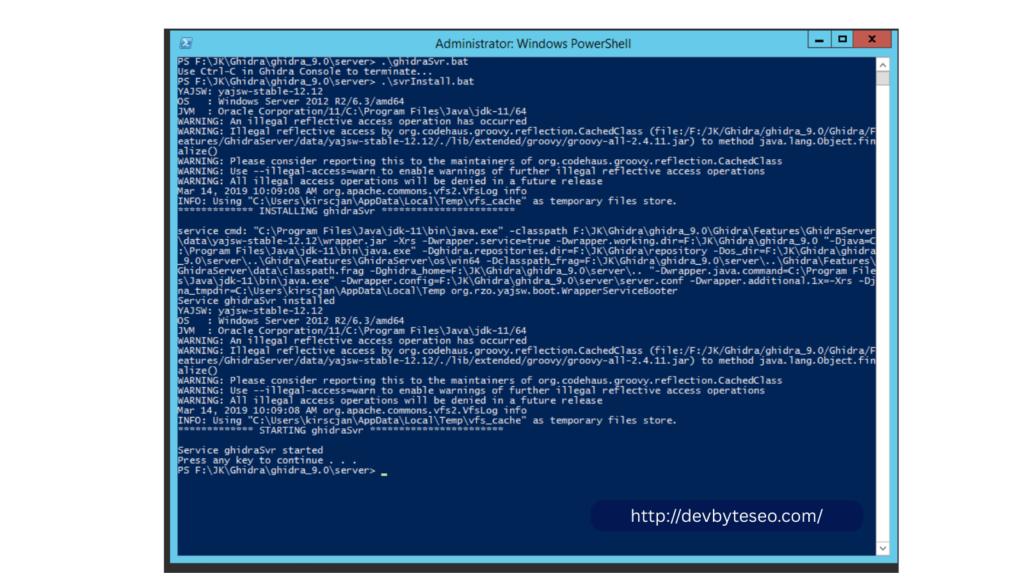
To set up a Ghidra Server, begin by ensuring you have the right environment. A dedicated machine running Java is ideal. Confirm that your system meets Ghidra’s requirements.
Next, download the latest version of Ghidra from its official site and extract it to your preferred directory. Locate the server files within the extracted folder; these are crucial for configuration.
Before starting, configure settings in `ghidra.properties`. This file contains essential parameters like port numbers and database configurations. Customize these according to your needs.
Once configured, launch the server using a terminal command or batch script specific to your operating system. Monitor the console output for any errors during startup.
After successful initialization, connect client applications via their respective interfaces using the specified host details. Enjoy seamless collaboration on reverse engineering projects with this powerful tool at your fingertips!
Features and Capabilities of Ghidra Server
Ghidra Server is a powerful tool designed for collaborative software reverse engineering. Its unique features make it stand out in the field of cybersecurity.
One key capability is its multi-user support, allowing several analysts to work simultaneously on the same project. This collaboration enhances efficiency and promotes knowledge sharing among team members.
Another notable feature is the ability to handle large binary files. Ghidra Server can analyze extensive datasets without compromising performance or speed, making it ideal for complex projects.
Additionally, Ghidra’s integration with various plugins expands its functionality further. Users can customize their environment by adding tools that suit their specific needs.
The server’s robust security protocols ensure that sensitive information remains protected during analysis sessions. This combination of features makes Ghidra Server an essential asset for any reverse engineering team looking to boost productivity and maintain data integrity.
Step-by-Step Guide on Using Ghidra Server
To use Ghidra Server effectively, start by launching the server application. Ensure that your environment is properly configured and that the necessary dependencies are installed.
Next, connect to the server using your client tool. Enter the server’s IP address and port number in the connection settings. This allows you to interface with your projects directly.
Once connected, create a new project or access an existing one from the Ghidra Server dashboard. The user-friendly interface makes navigation seamless.
Import binaries into your project for analysis. You can utilize various tools within Ghidra for disassembly and decompilation right after importing.
Collaborating with team members on shared projects is another key feature of Ghidra Server. Assign roles and permissions as needed to facilitate streamlined workflows across users focusing on different aspects of analysis.
Utilize built-in documentation features to keep track of changes made during collaborative efforts for better organization and efficiency.
Advanced Tips and Tricks for Efficient Use of Ghidra Server
To maximize your efficiency with Ghidra Server, consider setting up user roles. This allows you to manage permissions effectively. By defining what each user can access, you’ll streamline workflows and enhance security.
Utilize the command-line interface for batch processing tasks. It saves time when dealing with multiple files or projects simultaneously. A simple script can automate routine analyses, freeing you to focus on complex investigations.
Leverage built-in collaboration features by utilizing shared workspaces. This encourages team members to contribute in real-time while minimizing version control issues.
Keep an eye on performance metrics through the server dashboard. Monitoring resource usage helps identify bottlenecks early, allowing adjustments before they impact productivity.
Common Challenges and Troubleshooting Solutions
Using Ghidra Server can be rewarding, but you might face some challenges along the way. One common issue users encounter is connection problems. If your client can’t connect to the server, check your network settings and ensure that firewalls aren’t blocking the necessary ports.
Another hurdle could be performance lags during analysis. This often stems from insufficient server resources or heavy load on the system. Scaling up your hardware or optimizing existing setups can help mitigate such issues.
Sometimes, unexpected crashes occur during analysis workflows. Regularly saving your work and monitoring log files for errors will aid in quickly identifying problem areas.
Users also report difficulties with user permissions when collaborating in teams. Ensure that all team members have appropriate access rights set correctly within Ghidra’s configuration settings to facilitate smooth collaboration without interruptions.
FAQs
What is Ghidra Server?
Ghidra Server is a collaboration server that allows multiple users to work on the same reverse engineering project simultaneously with version control and access management.
Who developed Ghidra?
Ghidra was developed by the
National Security Agency (NSA) as an open-source reverse engineering framework.
Why should I use Ghidra Server instead of a local project?
Ghidra Server allows:
Team collaboration
Centralized storage
Version tracking
Access control
Conflict resolution
Local projects are single-user and do not support collaborative workflows.
What are the system requirements for running Ghidra Server?
Java (JDK 17 or higher recommended)
Windows or Linux system
Stable network connection
Open server port (default 13100)
How do users connect to Ghidra Server?
Users:
Open Ghidra
Create a Shared Project
Enter server IP, port, and login credentials
Access the shared repository
What is the default port used by Ghidra Server?
The default port is 13100, but it can be configured during installation.
Conclusion
Ghidra Server offers a powerful platform for collaborative software reverse engineering. With its extensive features and user-friendly setup, it’s become an invaluable tool for developers, security researchers, and analysts alike.
Utilizing Ghidra Server enhances productivity by allowing multiple users to work on the same project simultaneously. This capability is essential in today’s fast-paced environment where collaboration can significantly impact outcomes.
As you explore the capabilities of Ghidra Server, remember that practice will enhance your efficiency. Experiment with different features and configurations to find what best suits your needs.
For anyone looking to dive deeper into reverse engineering or improve their workflow through collaboration, mastering how to use Ghidra Server is well worth the investment of time and effort. Embrace this tool’s potential; it just might transform how you approach your projects.